
Credit One Bank Mobile
Credit One Bank, N.A.Finance
4.7215.37K Reviews
- Version
- 26.10.0
- Installs
- 10.00M
- Age Rating
- Everyone
Screenshots
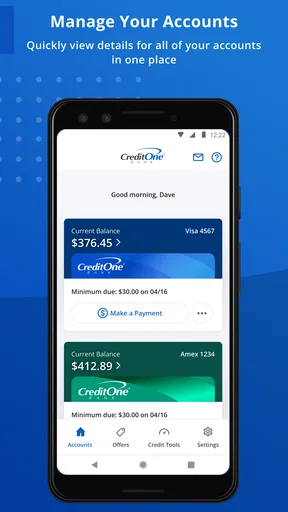
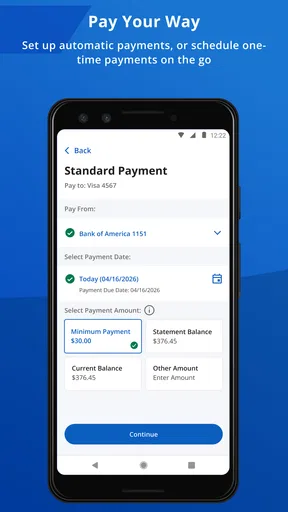
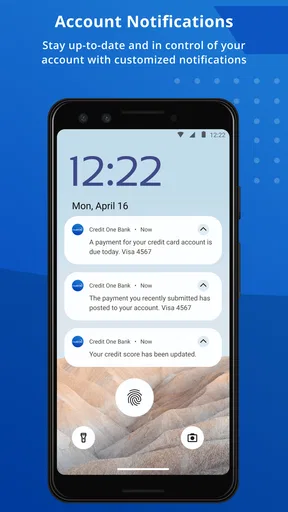
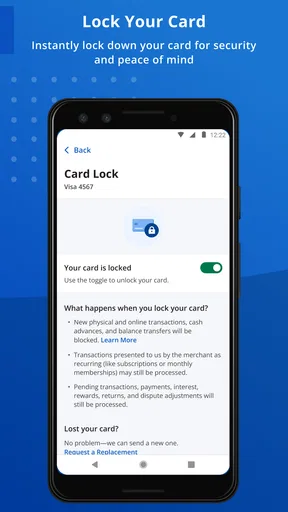
Our Review of Credit One Bank Mobile
 Analysis by Appyee
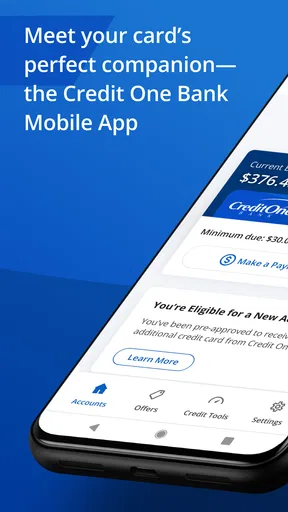
Managing a credit card from a phone sounds simple, but the quality of the experience depends on how quickly you can find the information you need and whether the app remains dependable when money is involved. I spent time looking at Credit One Bank Mobile as a dedicated finance app from Credit One Bank, N.A., and I found its main appeal easy to understand: it puts the everyday tasks connected with a Credit One Bank card in one mobile place rather than making you rely on a browser.
Credit One Bank Mobile is free, aimed at Everyone, and available for devices running Android or iOS versions supported by the current release. It has been available since September 19, 2016, and its current version is 26.07.0. With more than 10 million installs and an average rating of 4.7 from roughly 849,000 ratings, it is clearly not a niche banking tool. That popularity does not automatically make it perfect, but it does suggest that many cardholders find the basic mobile-account experience useful.
What the app feels like during ordinary card management
The best way to understand this app is to imagine a normal weekday. I check my card before buying groceries, want to know how much available credit remains, and later need to confirm whether a payment has been reflected. A dedicated banking app is more convenient for that routine than opening a general web browser, searching for the bank, finding the login page, and navigating a desktop-style account area.
That convenience is the central strength here. This is not an all-purpose budgeting platform, an investment dashboard, or a multi-bank money manager. It is focused on managing a Credit One Bank credit card account. That narrower purpose can feel reassuring because the app is not trying to turn a straightforward account check into a large financial-planning experience.
In my experience, the most useful habit is to open the app before making a purchase when the transaction would use a noticeable part of your available credit. That small check can help prevent an awkward declined payment and gives you a better sense of the account’s current position. I would also use it after making a payment, but I would avoid treating the first screen refresh as proof that every banking update has completed. Financial information can pass through several stages, so I prefer checking the account again later when timing matters.
The app is also a practical companion for people who dislike handling account administration on a computer. A phone is usually nearby when a payment reminder arrives or when a card transaction needs checking. That makes a mobile-first account tool more useful than a full website for quick questions, even if the website may still be preferable for longer sessions or more complicated research.
Speed expectations: quick checks rather than elaborate financial work
Credit One Bank Mobile feels best suited to short sessions. A cardholder typically opens it with a specific goal: inspect the account, review recent activity, or take care of a payment-related task. Because the purpose is focused, I would expect the app to feel more direct than a general banking portal with many unrelated products and menus.
There is an important distinction between app speed and account-data speed. A screen can open promptly while a recent transaction or payment status still needs time to appear. I would not judge the application harshly simply because a merchant charge is not visible immediately, and I would not repeat a payment action just because the display has not caught up. The safer workflow is to confirm what the app shows, wait when an update is still processing, and check again before trying the same action.
For quick balance checks, the mobile format is more efficient than signing in through a browser. For comparing many past transactions or studying spending over a long period, the advantage is less obvious. A phone screen naturally encourages brief scanning, while a larger display is better for careful comparison. This is one of the app’s practical trade-offs: it reduces friction for frequent small checks but does not replace every reason someone might use a full account website.
I also appreciate that the app’s value is not tied to constant use. A good finance app should be useful when needed, not demand that I spend time inside it. Credit One Bank Mobile makes more sense as a check-in tool than as an app I would browse every day for entertainment or broad financial education.
Heavy-use moments and the limits of a phone-based account
The busiest moments for a card-management app are not necessarily the moments with the most visual activity. They are situations where I am checking several recent transactions, verifying a payment, or trying to understand why the available credit does not match my expectation. These moments require patience because the account information matters more than a fast animation or a polished transition.
A realistic example is returning from a weekend trip and reviewing several purchases. I might open the app to separate ordinary card activity from a transaction I do not recognize. The mobile format is convenient because I can do that from the sofa or while commuting, but the small screen can make a longer review tiring. I would go line by line, avoid rushing, and record any detail I need before contacting the bank through an appropriate official channel.
Another demanding situation is making a payment close to a personal deadline. The app can make the action easier to initiate, but it should not encourage last-minute assumptions. I would check the amount carefully, review the confirmation presented in the app, and keep any confirmation details available until the account reflects the expected change. That is not a criticism unique to this application; it is a sensible discipline whenever a mobile screen is used for a financial action.
The app is less suitable when the task is broader than one Credit One Bank card. If I wanted a combined view of checking, savings, cards from several issuers, investments, and household budgeting, I would choose a dedicated money-management service or use each institution’s tools alongside a spreadsheet. Credit One Bank Mobile is deliberately more focused, and that focus becomes a limitation for people with a complex financial setup.
Resource demands should also be considered realistically. A finance app used for occasional account checks does not need to remain open all day, and I would not keep it running in the background unnecessarily. Closing it after a task is complete is a sensible routine, especially on an older phone where every active app competes for memory. The important performance question is not whether it behaves like a game or media app; it is whether it opens, presents account information clearly, and lets me finish a short task without avoidable confusion.
Reliability matters more than visual polish
For a finance application, reliability means more than avoiding crashes. It means knowing what the screen represents, recognizing when information may still be updating, and having a sensible recovery plan if a session is interrupted. I see Credit One Bank Mobile as most valuable when it gives me a dependable route back to my card account without forcing me to remember a complicated web address or search through unrelated pages.
Still, no mobile app should be treated as the only record of an important financial action. If the connection drops during a payment-related step, I would not immediately repeat the action. I would first reopen the app, inspect the account activity, and look for a confirmation or changed status. Repeating an action without checking can create more uncertainty than the original interruption.
That recovery approach is especially important when switching between Wi-Fi and mobile data, moving away from the app during a sign-in, or receiving a phone call in the middle of a task. A stable routine helps: finish one action at a time, wait for the app to show that it has accepted the step, and keep a note of the time and amount when the transaction is important.
There is also a human side to reliability. If I see a transaction I do not recognize, I would not rely on repeatedly refreshing the screen to explain it. I would first consider whether it could be a delayed merchant posting, a recurring charge, or a purchase made by someone authorized to use the card. If it still looks wrong, the app should be treated as a starting point for reviewing the account, not as a substitute for contacting Credit One Bank through its official support routes.
The strong average rating and large installed base give the app a reassuring public track record, but they do not remove the need for sensible caution. Finance apps can be affected by account status, connectivity, device conditions, and service availability. My verdict on reliability is therefore positive for routine access, with the qualification that important actions deserve verification rather than blind trust in a single screen.
Device constraints and the right kind of user
The stated minimum operating-system requirement is version 10, which is useful to know before installing. If your phone runs an older system, compatibility should be the first question rather than an assumption. On a supported device, I would still keep the operating system updated where possible, maintain enough free storage for normal app operation, and avoid using a heavily overloaded phone for time-sensitive account tasks.
Older or low-memory devices may make any banking app feel less responsive, especially after many other applications have been left open. That does not necessarily mean the account tool itself is poorly designed. A practical test is to restart the phone, close unnecessary apps, and try again. If the experience improves, the constraint may be the device environment rather than the account application.
Screen size also changes the experience. On a compact phone, reviewing a long list of transactions can require more scrolling and careful reading. On a larger phone or tablet-sized display, account information may be easier to inspect, although I would still prefer a computer for extended administrative work. The mobile app’s strength is availability, not turning a small screen into a complete financial office.
I would recommend it most strongly to existing Credit One Bank cardholders who want a convenient way to keep an eye on their account while away from a computer. It is particularly useful for people who check available credit before purchases, review activity regularly, or prefer completing routine account tasks from a phone.
I would be more cautious about recommending it to someone who wants a complete household-finance system. It will not be my first choice for consolidating several banks, planning investments, or replacing a detailed budget. Someone who rarely uses a smartphone may also prefer the bank’s conventional account-access options, since a mobile app only helps when the phone-based workflow feels comfortable.
Three habits that make the app more useful
- Check before spending, not only after spending. Looking at available credit before a larger purchase gives you context and may prevent an avoidable surprise at checkout.
- Separate a missing update from a failed action. If a recent payment or transaction is not visible, inspect the account again before attempting the same action a second time.
- Use the app for focused reviews. When checking several transactions, work through them deliberately and note anything that needs follow-up instead of treating a rapid scroll as a complete account review.
These habits are more valuable than simply installing the app and opening it occasionally. They turn the phone into a regular checkpoint for card management while preserving a sensible boundary: the app helps me see and manage the account, but I remain responsible for confirming important details.
How it compares with browser access and broader finance tools
Compared with using a browser, the dedicated app wins on convenience for short, repeated checks. I do not need to start from a search engine or navigate a full desktop layout. That makes it a better fit for checking the account at the point of need, such as before a purchase or after noticing a card notification.
Browser access can still be better when I am working on a larger screen, comparing many entries, or handling several online tasks at once. A browser also avoids adding another app to a phone, which may matter to people with limited storage or a strong preference for keeping financial tools off their device. The choice is not really about which option is universally superior; it is about whether speed of access or workspace matters more for the task.
Compared with independent budgeting apps, Credit One Bank Mobile has a narrower job and a more direct relationship with the Credit One Bank card account. A budgeting service may provide a wider household view, but it can also introduce extra setup and another place to check when the immediate question is simply related to one card. I would use this app for the account itself and a separate budgeting method for the bigger financial picture.
That division of labor is sensible. Trying to force one card-management app to become a complete financial planner usually creates unnecessary complexity. Credit One Bank Mobile is strongest when I let it remain what it is: a focused mobile access point for Credit One Bank card management.
Performance verdict: convenient, focused, and worth using with care
My overall impression is favorable. Credit One Bank Mobile is free, widely used, and built around a clear need rather than a collection of unrelated financial features. The current release, 26.07.0, gives supported users a modern route to their Credit One Bank card account, while the app’s long availability since September 19, 2016, adds useful context for people deciding whether a dedicated mobile option is established enough for regular use.
I would not describe it as a replacement for every banking channel. A phone is not always the best place for a detailed transaction investigation, a broad household budget, or a complicated administrative session. Performance can also feel different depending on the phone, operating system, connection, and how much information needs to update. For important payments or unusual account activity, I would verify the result instead of assuming that a quick tap has settled everything.
Even with those limitations, the app makes sense for its intended audience. If you already have a Credit One Bank card and want quick access to the account while shopping, traveling, or managing everyday expenses, I think it is a practical installation. Its strongest quality is not spectacle; it is reducing the distance between a question about your card and the account information needed to answer it.
With an Everyone age rating and no purchase price, it is easy to try on a compatible device. I would recommend keeping expectations focused: use it for convenient card-account management, build in a little patience when updates are still processing, and keep a broader budgeting tool or browser available when your financial task extends beyond this one account. Used that way, Credit One Bank Mobile is a sensible, focused companion rather than an overpromised replacement for every financial tool.
Privacy and Permissions
See what permissions an app requests and how it handles your data.
- Phone
- directly call phone numbers, read phone status and identity
- Photos/Media/Files
- read the contents of your USB storage, modify or delete the contents of your USB storage
- Storage
- read the contents of your USB storage, modify or delete the contents of your USB storage
- Device ID & call information
- read phone status and identity
- Other
- view network connections, full network access, run at startup, control vibration, prevent device from sleeping, install shortcuts, read Google service configuration
Verdict
Strengths of Credit One Bank Mobile
- Quick access to balances, transactions, and payment due dates.
- Mobile check deposit makes adding funds more convenient.
- Card controls help manage spending and protect the account.
- Payment reminders can help reduce the risk of missed due dates.
- Secure login and biometric access add protection on supported devices.
Limitations of Credit One Bank Mobile
- Some features may be limited depending on your Credit One card.
- Bank transfers and payments may take time to process.
- The app may promote additional Credit One products and offers.
- Customer support options can be less convenient than in-app account tools.
- Occasional updates or maintenance may temporarily affect access.
Similar Picks in This Category
View All
Google Wallet
Google LLC4.3

Airtel: Recharge, Bank & Loans
Airtel4.0

PayPal - Pay, Send, Save
PayPal Mobile4.2

DANA Indonesia Digital Wallet
PT Espay Debit Indonesia Koe4.5

Binance: Buy Bitcoin & Crypto
Binance Inc.4.8

Cash App
Block, Inc.4.7
Frequently Asked Questions
What is Credit One Bank Mobile used for?
Credit One Bank Mobile is the official app for managing eligible Credit One Bank credit card accounts from an Android or iOS device. After signing in, you can review your balance, available credit, recent transactions, payment due date, statements, and account alerts. It is mainly designed to make everyday card management quicker than using the bank’s website or calling customer service.
Can I make a credit card payment through the Credit One Bank Mobile app?
Yes, eligible cardholders can generally use the app to schedule payments from a linked bank account, view payment history, and check whether a payment has been processed. Before confirming a payment, review the selected funding account, amount, and date carefully. Processing times, cutoff times, payment limits, and available features may vary, so the app’s confirmation screen should be treated as the final reference.
Is Credit One Bank Mobile safe to use for managing my account?
The app is intended to provide secure access to Credit One Bank accounts, using sign-in protection and other security measures supplied by the bank. You should download it only from the official Google Play Store or Apple App Store, keep your device and app updated, and avoid entering credentials on public or unsecured networks. Never share verification codes, passwords, or full account details with anyone.
Do I need an existing Credit One Bank account to use the app?
Yes, the app is primarily intended for existing Credit One Bank cardholders and customers with eligible accounts. You will normally need your online banking credentials, or you may need to complete registration before signing in for the first time. If you have just received a card, cannot remember your login information, or are locked out, use the official recovery and support options shown in the app.
Are there any fees for using Credit One Bank Mobile?
Downloading and using the Credit One Bank Mobile app itself is generally not presented as a separate subscription service, but normal account terms still apply. Your credit card may have annual fees, late-payment fees, interest charges, or other costs described in its agreement. Mobile carrier data charges may also apply, and some payment methods or expedited services could have separate conditions or fees.
